Friday, April 11, 2014

How to Detecting and repairing disk errors


Detecting and repairing disk errors

You can use the Error-checking tool to check for file system errors and bad sectors on your hard disk.


  1. Open My Computer, and then select the local disk you want to check.
  2. On the File menu, click Properties.
  3. On the Tools tab, under Error-checking, click Check Now.
  4. Under Check disk options, select the Scan for and attempt recovery of bad sectors check box.


Note


  • To open My Computer, click Start, and then click My Computer
  • All files must be closed for this process to run. If the volume is currently in use, a message box will appear prompting you to indicate whether or not you want to reschedule the disk checking for the next time you restart your system. Then, the next time you restart your system, disk checking will run. Your volume will not be available to perform other tasks while this process is running.
  • If your volume is formatted as NTFS, Windows automatically logs all file transactions, replaces bad clusters, and stores copies of key information for all files on the NTFS volume.
  • For more information, click Related Topics.

PHP Interview Questions and Answers

What's PHP ?The PHP Hypertext Preprocessor is a programming language that allows web developers to create dynamic content that interacts with databases. PHP is basically used for developing web based software applications.

What Is a Session? 
A session is a logical object created by the PHP engine to allow you to preserve data across subsequent HTTP requests.

There is only one session object available to your PHP scripts at any time. Data saved to the session by a script can be retrieved by the same script or another script when requested from the same visitor.

Sessions are commonly used to store temporary data to allow multiple PHP pages to offer a complete functional transaction for the same visitor.

What Is a Persistent Cookie? 
A persistent cookie is a cookie which is stored in a cookie file permanently on the browser's computer. By default, cookies are created as temporary cookies which stored only in the browser's memory. When the browser is closed, temporary cookies will be erased. You should decide when to use temporary cookies and when to use persistent cookies based on their differences:
*Temporary cookies can not be used for tracking long-term information.
*Persistent cookies can be used for tracking long-term information.
*Temporary cookies are safer because no programs other than the browser can access them.
*Persistent cookies are less secure because users can open cookie files see the cookie values.

How can we know the number of days between two given dates using PHP? 
Simple arithmetic:

$date1 = date('Y-m-d');
$date2 = '2006-07-01';
$days = (strtotime() - strtotime()) / (60 * 60 * 24);
echo "Number of days since '2006-07-01': $days";
How can we repair a MySQL table?
The syntex for repairing a mysql table is:

REPAIR TABLE tablename
REPAIR TABLE tablename QUICK
REPAIR TABLE tablename EXTENDED

This command will repair the table specified.
If QUICK is given, MySQL will do a repair of only the index tree.
If EXTENDED is given, it will create index row by row.

What is meant by PEAR in php? 
Answer1:
PEAR is the next revolution in PHP. This repository is bringing higher level programming to PHP. PEAR is a framework and distribution system for reusable PHP components. It eases installation by bringing an automated wizard, and packing the strength and experience of PHP users into a nicely organised OOP library. PEAR also provides a command-line interface that can be used to automatically install "packages"

Answer2:
PEAR is short for "PHP Extension and Application Repository" and is pronounced just like the fruit. The purpose of PEAR is to provide:
A structured library of open-sourced code for PHP users
A system for code distribution and package maintenance
A standard style for code written in PHP
The PHP Foundation Classes (PFC),
The PHP Extension Community Library (PECL),
A web site, mailing lists and download mirrors to support the PHP/PEAR community
PEAR is a community-driven project with the PEAR Group as the governing body. The project has been founded by Stig S. Bakken in 1999 and quite a lot of people have joined the project since then.

How can we know the number of days between two given dates using PHP? 
Simple arithmetic:

$date1 = date('Y-m-d');
$date2 = '2006-07-01';
$days = (strtotime() - strtotime()) / (60 * 60 * 24);
echo "Number of days since '2006-07-01': $days";

How do you define a constant?
Via define() directive, like define ("MYCONSTANT", 100);


What are the differences between require and include, include_once? 
Anwser 1:
require_once() and include_once() are both the functions to include and evaluate the specified file only once. If the specified file is included previous to the present call occurrence, it will not be done again.

But require() and include() will do it as many times they are asked to do.

C Aptitude Questions and Answers

Predict the output or error(s) for the following:
1.    void main(){
            int  const * p=5;
            printf("%d",++(*p));
}

Answer:
Compiler error: Cannot modify a constant value.
Explanation:   
p is a pointer to a "constant integer". But we tried to change the value of the "constant integer".
2.    main(){
            char s[ ]="man";
            int i;
            for(i=0;s[ i ];i++)
            printf("\n%c%c%c%c",s[ i ],*(s+i),*(i+s),i[s]);
}

Answer:
                        mmmm
                       aaaa
                       nnnn
Explanation:
s[i], *(i+s), *(s+i), i[s] are all different ways of expressing the same idea. Generally  array name is the base address for that array. Here s is the base address. i is the index number/displacement from the base address. So, indirecting it with * is same as s[i]. i[s] may be surprising. But in the  case of  C  it is same as s[i].
3.      main(){
            float me = 1.1;
            double you = 1.1;
            if(me==you)
printf("I love U");
else
                        printf("I hate U");
}

Answer:
I hate U

Explanation:
For floating point numbers (float, double, long double) the values cannot be predicted exactly. Depending on the number of bytes, the precession with of the value  represented varies. Float takes 4 bytes and long double takes 10 bytes. So float stores 0.9 with less precision than long double.
Rule of Thumb:
Never compare or at-least be cautious when using floating point numbers with relational operators (== , >, <, <=, >=,!= ) . 
4.      main()
            {
            static int var = 5;
            printf("%d ",var--);
            if(var)
                        main();
            }

Answer:
5 4 3 2 1

Explanation:
When static storage class is given, it is initialized once. The change in the value of a static variable is retained even between the function calls. Main is also treated like any other ordinary function, which can be called recursively. 
5.      main(){
             int c[ ]={2.8,3.4,4,6.7,5};
             int j,*p=c,*q=c;
             for(j=0;j<5;j++) {
                        printf(" %d ",*c);
                        ++q;     }
             for(j=0;j<5;j++){
printf(" %d ",*p);
++p;     }
}

Answer:
                        2 2 2 2 2 2 3 4 6 5

Explanation:
Initially pointer c is assigned to both p and q. In the first loop, since only q is incremented and not c , the value 2 will be printed 5 times. In second loop p itself is incremented. So the values 2 3 4 6 5 will be printed.
6.      main(){
            extern int i;
            i=20;
printf("%d",i);
}

Answer: 
Linker Error : Undefined symbol '_i'
Explanation:
                        extern storage class in the following declaration,
                                    extern int i;
specifies to the compiler that the memory for i is allocated in some other program and that address will be given to the current program at the time of linking. But linker finds that no other variable of name i is available in any other program with memory space allocated for it. Hence a linker error has occurred .
Predict the output or error(s) for the following:
7
.      main(){
            int i=-1,j=-1,k=0,l=2,m;
            m=i++&&j++&&k++||l++;
            printf("%d %d %d %d %d",i,j,k,l,m);
}

Answer:
                        0 0 1 3 1

Explanation :
Logical operations always give a result of 1 or 0 . And also the logical AND (&&) operator has higher priority over the logical OR (||) operator. So the expression  ‘i++ && j++ && k++’ is executed first. The result of this expression is 0    (-1 && -1 && 0 = 0). Now the expression is 0 || 2 which evaluates to 1 (because OR operator always gives 1 except for ‘0 || 0’ combination- for which it gives 0). So the value of m is 1. The values of other variables are also incremented by 1.
8.      main()
     {
            char *p;
            printf("%d %d ",sizeof(*p),sizeof(p));
       }
 
Answer:
                        1 2

Explanation:
The sizeof() operator gives the number of bytes taken by its operand. P is a character pointer, which needs one byte for storing its value (a character). Hence sizeof(*p) gives a value of 1. Since it needs two bytes to store the address of the character pointer sizeof(p) gives 2.
9.      main(){
            int i=3;
            switch(i)
             {
                default:printf("zero");
                case 1: printf("one");
                           break;
               case 2:printf("two");
                          break;
              case 3: printf("three");
                          break;
              }  
}

Answer :
three

Explanation :
The default case can be placed anywhere inside the loop. It is executed only when all other cases doesn't match.
10.      main(){
              printf("%x",-1<<4);
}

Answer:
fff0

Explanation :
-1 is internally represented as all 1's. When left shifted four times the least significant 4 bits are filled with 0's.The %x format specifier specifies that the integer value be printed as a hexadecimal value.
11.      main(){
            char string[]="Hello World";
            display(string);
}
void display(char *string)
{
            printf("%s",string);
}

Answer:
Compiler Error : Type mismatch in redeclaration of function display

Explanation :
In third line, when the function display is encountered, the compiler doesn't know anything about the function display. It assumes the arguments and return types to be integers, (which is the default type). When it sees the actual function display, the arguments and type contradicts with what it has assumed previously. Hence a compile time error occurs.
12.      main(){
            int c=- -2;
            printf("c=%d",c);
}

Answer:
                                    c=2;

Explanation:
Here unary minus (or negation) operator is used twice. Same maths  rules applies, ie. minus * minus= plus.
Note:
However you cannot give like --2. Because -- operator can  only be applied to variables as a decrement operator (eg., i--). 2 is a constant and not a variable.
13.      #define int char
main()
{
            int i=65;
            printf("sizeof(i)=%d",sizeof(i));
}

Answer:
                        sizeof(i)=1

Explanation:
Since the #define replaces the string  int by the macro char
14.      main(){
int i=10;
i=!i>14;
Printf ("i=%d",i);
}

Answer:
i=0

Explanation:
In the expression !i>14 , NOT (!) operator has more precedence than ‘ >’ symbol.  ! is a unary logical operator. !i (!10) is 0 (not of true is false).  0>14 is false (zero).
Predict the output or error(s) for the following:15.      #include
main()
{
char s[]={'a','b','c','\n','c','\0'};
char *p,*str,*str1;
p=&s[3];
str=p;
str1=s;
printf("%d",++*p + ++*str1-32);
}

Answer:
77       

Explanation:
p is pointing to character '\n'. str1 is pointing to character 'a' ++*p. "p is pointing to '\n' and that is incremented by one." the ASCII value of '\n' is 10, which is then incremented to 11. The value of ++*p is 11. ++*str1, str1 is pointing to 'a' that is incremented by 1 and it becomes 'b'. ASCII value of 'b' is 98.
 Now performing (11 + 98 – 32), we get 77("M");
 So we get the output 77 :: "M" (Ascii is 77).
16.      #include
          main()
{
int a[2][2][2] = { {10,2,3,4}, {5,6,7,8}  };
int *p,*q;
p=&a[2][2][2];
*q=***a;
printf("%d----%d",*p,*q);
}

Answer:
SomeGarbageValue---1

Explanation:
p=&a[2][2][2]  you declare only two 2D arrays, but you are trying to access the third 2D(which you are not declared) it will print garbage values. *q=***a starting address of a is assigned integer pointer. Now q is pointing to starting address of a. If you print *q, it will print first element of 3D array.
17.      #include
         main()
{
struct xx
{
      int x=3;
      char name[]="hello";
 };
struct xx *s;
printf("%d",s->x);
printf("%s",s->name);
}

Answer:
Compiler Error

Explanation:
You should not initialize variables in declaration
18.      #include
           main()
{
struct xx
{
int x;
struct yy
{
char s;
            struct xx *p;
};
struct yy *q;
};
}

Answer:
Compiler Error

Explanation:
The structure yy is nested within structure xx. Hence, the elements are of yy are to be accessed through the instance of structure xx, which needs an instance of yy to be known. If the instance is created after defining the structure the compiler will not know about the instance relative to xx. Hence for nested structure yy you have to declare member.

HTML Interview Questions and Answers

What is HTML?
Answer1:
HTML, or HyperText Markup Language, is a Universal language which allows an individual using special code to create web pages to be viewed on the Internet.

Answer2:
HTML ( H yper T ext M arkup L anguage) is the language used to write Web pages. You are looking at a Web page right now.
You can view HTML pages in two ways:
* One view is their appearance on a Web browser, just like this page -- colors, different text sizes, graphics.
* The other view is called "HTML Code" -- this is the code that tells the browser what to do.
What is a tag? 
In HTML, a tag tells the browser what to do. When you write an HTML page, you enter tags for many reasons -- to change the appearance of text, to show a graphic, or to make a link to another page.
What is the simplest HTML page? 
HTML Code:
<HTML>
<HEAD>
<TITLE>This is my page title! </TITLE>
</HEAD>
<BODY>
This is my message to the world!
</BODY>
</HTML>

Browser Display:
This is my message to the world!
How do I create frames? What is a frameset? 
Frames allow an author to divide a browser window into multiple (rectangular) regions. Multiple documents can be displayed in a single window, each within its own frame. Graphical browsers allow these frames to be scrolled independently of each other, and links can update the document displayed in one frame without affecting the others.
You can't just "add frames" to an existing document. Rather, you must create a frameset document that defines a particular combination of frames, and then display your content documents inside those frames. The frameset document should also include alternative non-framed content in a NOFRAMES element.
The HTML 4 frames model has significant design flaws that cause usability problems for web users. Frames should be used only with great care.
How can I include comments in HTML? 
Technically, since HTML is an SGML application, HTML uses SGML comment syntax. However, the full syntax is complex, and browsers don't support it in its entirety anyway. Therefore, use the following simplified rule to create HTML comments that both have valid syntax and work in browsers:

An HTML comment begins with "<!--", ends with "-->", and does not contain "--" or ">" anywhere in the comment.
The following are examples of HTML comments:

* <!-- This is a comment. -->
* <!-- This is another comment,
and it continues onto a second line. -->
* <!---->

Do not put comments inside tags (i.e., between "<" and ">") in HTML markup.
What is a Hypertext link? 
A hypertext link is a special tag that links one page to another page or resource. If you click the link, the browser jumps to the link's destination.
How comfortable are you with writing HTML entirely by hand?
Very. I don’t usually use WYSIWYG. The only occasions when I do use Dreamweaver are when I want to draw something to see what it looks like, and then I’ll usually either take that design and hand-modify it or build it all over again from scratch in code. I have actually written my own desktop HTML IDE for Windows (it’s called Less Than Slash) with the intention of deploying it for use in web development training. If has built-in reference features, and will autocomplete code by parsing the DTD you specify in the file. That is to say, the program doesn’t know anything about HTML until after it parses the HTML DTD you specified. This should give you some idea of my skill level with HTML.
What is everyone using to write HTML? 
Everyone has a different preference for which tool works best for them. Keep in mind that typically the less HTML the tool requires you to know, the worse the output of the HTML. In other words, you can always do it better by hand if you take the time to learn a little HTML.
What is a DOCTYPE? Which one do I use? 
According to HTML standards, each HTML document begins with a DOCTYPE declaration that specifies which version of HTML the document uses. Originally, the DOCTYPE declaration was used only by SGML-based tools like HTML validators, which needed to determine which version of HTML a document used (or claimed to use).
Today, many browsers use the document's DOCTYPE declaration to determine whether to use a stricter, more standards-oriented layout mode, or to use a "quirks" layout mode that attempts to emulate older, buggy browsers.
Can I nest tables within tables? 
Yes, a table can be embedded inside a cell in another table. Here's a simple example:

<table>
<tr>
<td>this is the first cell of the outer table</td>
<td>this is the second cell of the outer table,

with the inner table embedded in it
<table>
<tr>
<td>this is the first cell of the inner table</td>
<td>this is the second cell of the inner table</td>
</tr>
</table>
</td>
</tr>
</table>

The main caveat about nested tables is that older versions of Netscape Navigator have problems with them if you don't explicitly close your TR, TD, and TH elements. To avoid problems, include every </tr>, </td>, and </th> tag, even though the HTML specifications don't require them. Also, older versions of Netscape Navigator have problems with tables that are nested extremely deeply (e.g., tables nested ten deep). To avoid problems, avoid nesting tables more than a few deep. You may be able to use the ROWSPAN and COLSPAN attributes to minimize table nesting. Finally, be especially sure to validate your markup whenever you use nested tables.
How do I align a table to the right (or left)?
You can use <TABLE ALIGN="right"> to float a table to the right. (Use ALIGN="left" to float it to the left.) Any content that follows the closing </TABLE> tag will flow around the table. Use <BR CLEAR="right"> or <BR CLEAR="all"> to mark the end of the text that is to flow around the table, as shown in this example:

The table in this example will float to the right.
<table align="right">...</table>
This text will wrap to fill the available space to the left of (and if the text is long enough, below) the table.
<br clear="right">
This text will appear below the table, even if there is additional room to its left.
How can I use tables to structure forms? 
Small forms are sometimes placed within a TD element within a table. This can be a useful for positioning a form relative to other content, but it doesn't help position the form-related elements relative to each other.
To position form-related elements relative to each other, the entire table must be within the form. You cannot start a form in one TH or TD element and end in another. You cannot place the form within the table without placing it inside a TH or TD element. You can put the table inside the form, and then use the table to position the INPUT, TEXTAREA, SELECT, and other form-related elements, as shown in the following example.

<FORM ACTION="[URL]">
<TABLE BORDER="0">
<TR>
<TH>Account:</TH>
<TD><INPUT TYPE="text" NAME="account"></TD>
</TR>
<TR>
<TH>Password:</TH>
<TD><INPUT TYPE="password" NAME="password"></TD>
</TR>
<TR>
<TD> </TD>
<TD><INPUT TYPE="submit" NAME="Log On"></TD>
</TR>
</TABLE>
</FORM>
How do I center a table? 
In your HTML, use

<div class="center">
<table>...</table>
</div>

In your CSS, use

div.center {
text-align: center;
}

div.center table {
margin-left: auto;
margin-right: auto;
text-align: left;
}
How do I use forms? 
The basic syntax for a form is: <FORM ACTION="[URL]">...</FORM>
When the form is submitted, the form data is sent to the URL specified in the ACTION attribute. This URL should refer to a server-side (e.g., CGI) program that will process the form data. The form itself should contain

* at least one submit button (i.e., an <INPUT TYPE="submit" ...> element),
* form data elements (e.g., <INPUT>, <TEXTAREA>, and <SELECT>) as needed, and
* additional markup (e.g., identifying data elements, presenting instructions) as needed.
How can I check for errors? 
HTML validators check HTML documents against a formal definition of HTML syntax and then output a list of errors. Validation is important to give the best chance of correctness on unknown browsers (both existing browsers that you haven't seen and future browsers that haven't been written yet).
HTML checkers (linters) are also useful. These programs check documents for specific problems, including some caused by invalid markup and others caused by common browser bugs. Checkers may pass some invalid documents, and they may fail some valid ones.
All validators are functionally equivalent; while their reporting styles may vary, they will find the same errors given identical input. Different checkers are programmed to look for different problems, so their reports will vary significantly from each other. Also, some programs that are called validators (e.g. the "CSE HTML Validator") are really linters/checkers. They are still useful, but they should not be confused with real HTML validators.
When checking a site for errors for the first time, it is often useful to identify common problems that occur repeatedly in your markup. Fix these problems everywhere they occur (with an automated process if possible), and then go back to identify and fix the remaining problems.
Link checkers follow all the links on a site and report which ones are no longer functioning. CSS checkers report problems with CSS style sheets.
Do I have to memorize a bunch of tags? 
No. Most programs that help you write HTML code already know most tags, and create them when you press a button. But you should understand what a tag is, and how it works. That way you can correct errors in your page more easily.
How do I make a form so it can be submitted by hitting ENTER?
The short answer is that the form should just have one <INPUT TYPE=TEXT> and no TEXTAREA, though it can have other form elements like checkboxes and radio buttons.
How do I set the focus to the first form field? 
You cannot do this with HTML. However, you can include a script after the form that sets the focus to the appropriate field, like this:

<form id="myform" name="myform" action=...>
<input type="text" id="myinput" name="myinput" ...>
</form>

<script type="text/javascript">
document.myform.myinput.focus();
</script>

A similar approach uses <body onload=...> to set the focus, but some browsers seem to process the ONLOAD event before the entire document (i.e., the part with the form) has been loaded.
How can I eliminate the extra space after a </form> tag? 
HTML has no mechanism to control this. However, with CSS, you can set the margin-bottom of the form to 0. For example:
<form style="margin-bottom:0;" action=...>

You can also use a CSS style sheet to affect all the forms on a page:
form { margin-bottom: 0 ; }
How can I use tables to structure forms? 
Small forms are sometimes placed within a TD element within a table. This can be a useful for positioning a form relative to other content, but it doesn't help position the form-related elements relative to each other.
To position form-related elements relative to each other, the entire table must be within the form. You cannot start a form in one TH or TD element and end in another. You cannot place the form within the table without placing it inside a TH or TD element. You can put the table inside the form, and then use the table to position the INPUT, TEXTAREA, SELECT, and other form-related elements, as shown in the following example.
<form action="[URL]">
<table border="0">
<tr>
<th scope="row">
<label for="account">Account:</label>
</th>
<td>
<input type="text" name="account" id="account">
</td>
</tr>
<tr>
<th scope="row">
<label for="password">Password:
</th>
<td>
<input type="password" name="password" id="password">
</td>
</tr>
<tr>
<td> </td>
<td><input type="submit" name="Log On"></td>
</tr>
</table>
</form>

कम्प्यूटर टिप्स -अपने पी.सी. PC का टाइम Time इंटरनेशनल घड़ी International clock से अपडेट Update करें :-कम्प्यूटर टिप्स -अपने पी.सी. PC का टाइम Time इंटरनेशनल घड़ी International clock से अपडेट Update करें :-

कम्प्यूटर टिप्स Computer Tips -अपने पी.सी. PC का टाइम Time इंटरनेशनल घड़ी International clock से अपडेट Update करें :-

क्या आप अपने पी.सी. PC का टाइम Time इंटरनेशनल घड़ी International clock से अपडेट Update करना चाहते हैं.
प्रस्तुत है आसान सा टिप्स Tips :-

-- Time & Date ऑप्शन पर जाएँ. 
-- सलेक्ट Update.
-- यह Microsoft's Server के साथ आपके PC का टाइम अपडेट कर देगा।

Java Interview Questions and Answers

What is Collection API ?
The Collection API is a set of classes and interfaces that support operation on collections of objects. These classes and interfaces are more flexible, more powerful, and more regular than the vectors, arrays, and hashtables if effectively replaces.
Example of classes: HashSet, HashMap, ArrayList, LinkedList, TreeSet and TreeMap.
Example of interfaces: Collection, Set, List and Map.
Is Iterator a Class or Interface? What is its use? 
Answer: Iterator is an interface which is used to step through the elements of a Collection.
What is similarities/difference between an Abstract class and Interface? 
Differences are as follows:
Interfaces provide a form of multiple inheritance. A class can extend only one other class. Interfaces are limited to public methods and constants with no implementation. Abstract classes can have a partial implementation, protected parts, static methods, etc.
A Class may implement several interfaces. But in case of abstract class, a class may extend only one abstract class. Interfaces are slow as it requires extra indirection to to find corresponding method in in the actual class. Abstract classes are fast.
Similarities:

Neither Abstract classes or Interface can be instantiated.
Java Interview Questions - How to define an Abstract class? 
A class containing abstract method is called Abstract class. An Abstract class can't be instantiated.
Example of Abstract class:
abstract class testAbstractClass {
protected String myString;
public String getMyString() {
return myString;
}
public abstract string anyAbstractFunction();
}
How to define an Interface in Java ? In Java Interface defines the methods but does not implement them. Interface can include constants. A class that implements the interfaces is bound to implement all the methods defined in Interface.
Emaple of Interface:

public interface sampleInterface {
public void functionOne();

public long CONSTANT_ONE = 1000; 
}
If a class is located in a package, what do you need to change in the OS environment to be able to use it?
You need to add a directory or a jar file that contains the package directories to the CLASSPATH environment variable. Let's say a class Employee belongs to a package com.xyz.hr; and is located in the file c:\dev\com\xyz\hr\Employee.java. In this case, you'd need to add c:\dev to the variable CLASSPATH. If this class contains the method main(), you could test it from a command prompt window as follows:
c:\>java com.xyz.hr.Employee
How many methods in the Serializable interface? 
There is no method in the Serializable interface. The Serializable interface acts as a marker, telling the object serialization tools that your class is serializable.
How many methods in the Externalizable interface? There are two methods in the Externalizable interface. You have to implement these two methods in order to make your class externalizable. These two methods are readExternal() and writeExternal().
What is the difference between Serializalble and Externalizable interface? 
When you use Serializable interface, your class is serialized automatically by default. But you can override writeObject() and readObject() two methods to control more complex object serailization process. When you use Externalizable interface, you have a complete control over your class's serialization process.
What is a transient variable in Java? 
A transient variable is a variable that may not be serialized. If you don't want some field to be serialized, you can mark that field transient or static.
Which containers use a border layout as their default layout? 
The Window, Frame and Dialog classes use a border layout as their default layout.
How are Observer and Observable used? 
Objects that subclass the Observable class maintain a list of observers. When an Observable object is updated, it invokes the update() method of each of its observers to notify the observers that it has changed state. The Observer interface is implemented by objects that observe Observable objects.
What  is Java?
Java is an object-oriented programming language developed initially by James Gosling and colleagues at Sun Microsystems. The language, initially called Oak (named after the oak trees outside Gosling's office), was intended to replace C++, although the feature set better resembles that of Objective C. Java should not be confused with JavaScript, which shares only the name and a similar C-like syntax. Sun Microsystems currently maintains and updates Java regularly.
What does a well-written OO program look like? 
A well-written OO program exhibits recurring structures that promote abstraction, flexibility, modularity and elegance.
Can you have virtual functions in Java? 
Yes, all functions in Java are virtual by default. This is actually a pseudo trick question because the word "virtual" is not part of the naming convention in Java (as it is in C++, C-sharp and VB.NET), so this would be a foreign concept for someone who has only coded in Java. Virtual functions or virtual methods are functions or methods that will be redefined in derived classes.
Jack developed a program by using a Map container to hold key/value pairs. He wanted to make a change to the map. He decided to make a clone of the map in order to save the original data on side. What do you think of it? ? 
If Jack made a clone of the map, any changes to the clone or the original map would be seen on both maps, because the clone of Map is a shallow copy. So Jack made a wrong decision.
What is more advisable to create a thread, by implementing a Runnable interface or by extending Thread class? Strategically speaking, threads created by implementing Runnable interface are more advisable. If you create a thread by extending a thread class, you cannot extend any other class. If you create a thread by implementing Runnable interface, you save a space for your class to extend another class now or in future.
What is NullPointerException and how to handle it?
When an object is not initialized, the default value is null. When the following things happen, the NullPointerException is thrown:
--Calling the instance method of a null object.
--Accessing or modifying the field of a null object.
--Taking the length of a null as if it were an array.
--Accessing or modifying the slots of null as if it were an array.
--Throwing null as if it were a Throwable value.
The NullPointerException is a runtime exception. The best practice is to catch such exception even if it is not required by language design.
An application needs to load a library before it starts to run, how to code?
One option is to use a static block to load a library before anything is called. For example,
class Test {
static {
System.loadLibrary("path-to-library-file");
}
....
}
When you call new Test(), the static block will be called first before any initialization happens. Note that the static block position may matter.
How could Java classes direct program messages to the system console, but error messages, say to a file? The class System has a variable out that represents the standard output, and the variable err that represents the standard error device. By default, they both point at the system console. This how the standard output could be re-directed:
Stream st = new Stream(new FileOutputStream("output.txt")); System.setErr(st); System.setOut(st);
What's the difference between an interface and an abstract class? 
An abstract class may contain code in method bodies, which is not allowed in an interface. With abstract classes, you have to inherit your class from it and Java does not allow multiple inheritance. On the other hand, you can implement multiple interfaces in your class.
Name the containers which uses Border Layout as their default layout? 
Containers which uses Border Layout as their default are: window, Frame and Dialog classes.
What do you understand by Synchronization? 
Synchronization is a process of controlling the access of shared resources by the multiple threads in such a manner that only one thread can access one resource at a time. In non synchronized multithreaded application, it is possible for one thread to modify a shared object while another thread is in the process of using or updating the object's value.
Synchronization prevents such type of data corruption.
E.g. Synchronizing a function:
public synchronized void Method1 () {
// Appropriate method-related code. 
}
E.g. Synchronizing a block of code inside a function:
public myFunction (){
synchronized (this) {
// Synchronized code here.
}What is synchronization and why is it important?
With respect to multithreading, synchronization is the capability to control the access of multiple threads to shared resources. Without synchronization, it is possible for one thread to modify a shared object while another thread is in the process of using or updating that object's value. This often causes dirty data and leads to significant errors.
What are synchronized methods and synchronized statements? 
Synchronized methods are methods that are used to control access to a method or an object. A thread only executes a synchronized method after it has acquired the lock for the method's object or class. Synchronized statements are similar to synchronized methods. A synchronized statement can only be executed after a thread has acquired the lock for the object or class referenced in the synchronized statement.
What are three ways in which a thread can enter the waiting state? 
A thread can enter the waiting state by invoking its sleep() method, by blocking on IO, by unsuccessfully attempting to acquire an object's lock, or by invoking an object's wait() method. It can also enter the waiting state by invoking its (deprecated) suspend() method.
Can a lock be acquired on a class? 
Yes, a lock can be acquired on a class. This lock is acquired on the class's Class object.
What's new with the stop(), suspend() and resume() methods in JDK 1.2? 
The stop(), suspend() and resume() methods have been deprecated in JDK 1.2.
What is the preferred size of a component? The preferred size of a component is the minimum component size that will allow the component to display normally.
What's the difference between J2SDK 1.5 and J2SDK 5.0? 
There's no difference, Sun Microsystems just re-branded this version.
What would you use to compare two String variables - the operator == or the method equals()? 
I'd use the method equals() to compare the values of the Strings and the == to check if two variables point at the same instance of a String object.
What is thread? 
A thread is an independent path of execution in a system.
What is multi-threading? 
Multi-threading means various threads that run in a system.
How does multi-threading take place on a computer with a single CPU? 
The operating system's task scheduler allocates execution time to multiple tasks. By quickly switching between executing tasks, it creates the impression that tasks execute sequentially.
How to create a thread in a program? 
You have two ways to do so. First, making your class "extends" Thread class. Second, making your class "implements" Runnable interface. Put jobs in a run() method and call start() method to start the thread.
Can Java object be locked down for exclusive use by a given thread? Yes. You can lock an object by putting it in a "synchronized" block. The locked object is inaccessible to any thread other than the one that explicitly claimed it.
Can each Java object keep track of all the threads that want to exclusively access to it? 
Yes. Use Thread.currentThread() method to track the accessing thread.
Does it matter in what order catch statements for FileNotFoundException and IOExceptipon are written? 
Yes, it does. The FileNoFoundException is inherited from the IOException. Exception's subclasses have to be caught first.
What invokes a thread's run() method? 
After a thread is started, via its start() method of the Thread class, the JVM invokes the thread's run() method when the thread is initially executed. 
}

Data Types in Java

Data Types in Java

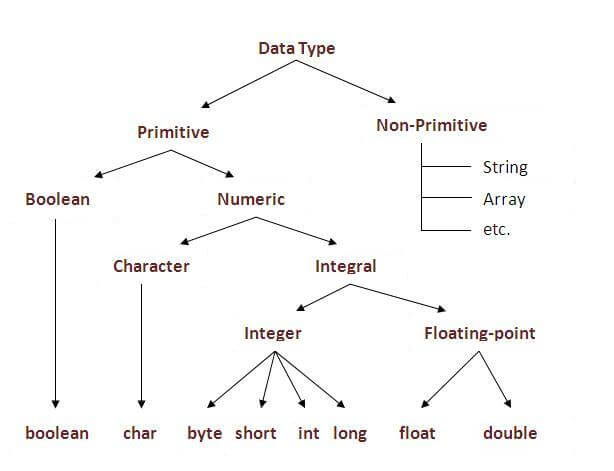
In java, there are two types of data types
  • primitive data types
  • non-primitive data types
datatype in java
Data TypeDefault ValueDefault size
booleanfalse1 bit
char'\u0000'2 byte
byte01 byte
short02 byte
int04 byte
long0L8 byte
float0.0f4 byte
double0.0d8 byte

Why char uses 2 byte in java and what is \u0000 ?

because java uses unicode system rather than ASCII code system. \u0000 is the lowest range of unicode system.To get detail about Unicode see below.

Difference between JDK, JRE and JVM

Understanding the difference between JDK, JRE and JVM is important in Java. We are having brief overview of JVM here.
If you want to get the detailed knowledge of Java Virtural Machine, move to the next page. Firstly, let's see the basic differences between the JDK, JRE and JVM.


JVM

JVM (Java Virtual Machine) is an abstract machine. It is a specification that provides runtime environment in which java bytecode can be executed.
JVMs are available for many hardware and software platforms. JVM, JRE and JDK are platform dependent because configuration of each OS differs. But, Java is platform independent.
The JVM performs following main tasks:
  • Loads code
  • Verifies code
  • Executes code
  • Provides runtime environment

JRE

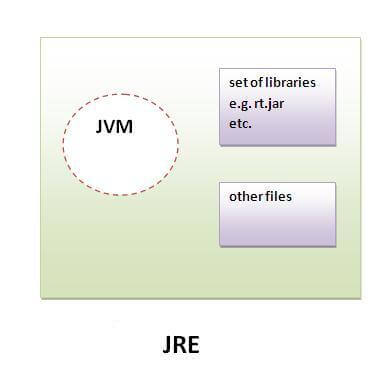
JRE is an acronym for Java Runtime Environment.It is used to provide runtime environment.It is the implementation of JVM.It physically exists.It contains set of libraries + other files that JVM uses at runtime.
Implementation of JVMs are also actively released by other companies besides Sun Micro Systems.
jre

JDK

JDK is an acronym for Java Development Kit.It physically exists.It contains JRE + development tools.

JVM (Java Virtual Machine)

JVM (Java Virtual Machine) is an abstract machine. It is a specification that provides runtime environment in which java bytecode can be executed.
JVMs are available for many hardware and software platforms (i.e.JVM is plateform dependent).

What is JVM?

It is:
  1. A specification where working of Java Virtual Machine is specified. But implementation provider is independent to choose the algorithm. Its implementation has been provided by Sun and other companies.
  2. An implementation Its implementation is known as JRE (Java Runtime Environment).
  3. Runtime Instance Whenever you write java command on the command prompt to run the java class, and instance of JVM is created.

What it does?

The JVM performs following operation:
  • Loads code
  • Verifies code
  • Executes code
  • Provides runtime environment
JVM provides definitions for the:
  • Memory area
  • Class file format
  • Register set
  • Garbage-collected heap
  • Fatal error reporting etc.

Internal Architecture of JVM

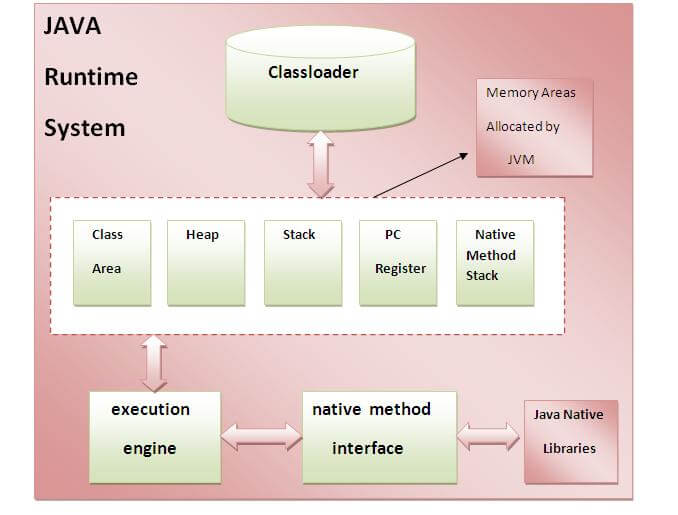
Let's understand the internal architecture of JVM. It contains classloader, memory area, execution engine etc.
Jvm Internal

1) Classloader:

Classloader is a subsystem of JVM that is used to load class files.

2) Class(Method) Area:

Class(Method) Area stores per-class structures such as the runtime constant pool, field and method data, the code for methods.

3) Heap:

It is the runtime data area in which objects are allocated.

4) Stack:

Java Stack stores frames.It holds local variables and partial results, and plays a part in method invocation and return.
Each thread has a private JVM stack, created at the same time as thread.
A new frame is created each time a method is invoked. A frame is destroyed when its method invocation completes.

5) Program Counter Regiser:

PC (program counter) register. It contains the address of the Java virtual machine instruction currently being executed.

6) Native Method Stack:

It contains all the native methods used in the application.

7) Execution Engine:

It contains:
1) A virtual processor
2) Interpreter:Read bytecode stream then execute the instructions.
3) Just-In-Time(JIT) compiler:It is used to improve the performance.JIT compiles parts of the byte code that have similar functionality at the same time, and hence reduces the amount of time needed for compilation.Here the term ?compiler? refers to a translator from the instruction set of a Java virtual machine (JVM) to the instruction set of a specific CPU.